
Columnar In-Memory Analytics using Arrow
Folks, there is a new library in town that is taking the data engineering community by storm.
Introducing, Apache Arrow
Apache Arrow is a cross-language development platform for in-memory data. It specifies a standardized language-independent columnar memory format for flat and hierarchical data, organized for efficient analytic operations on modern hardware.
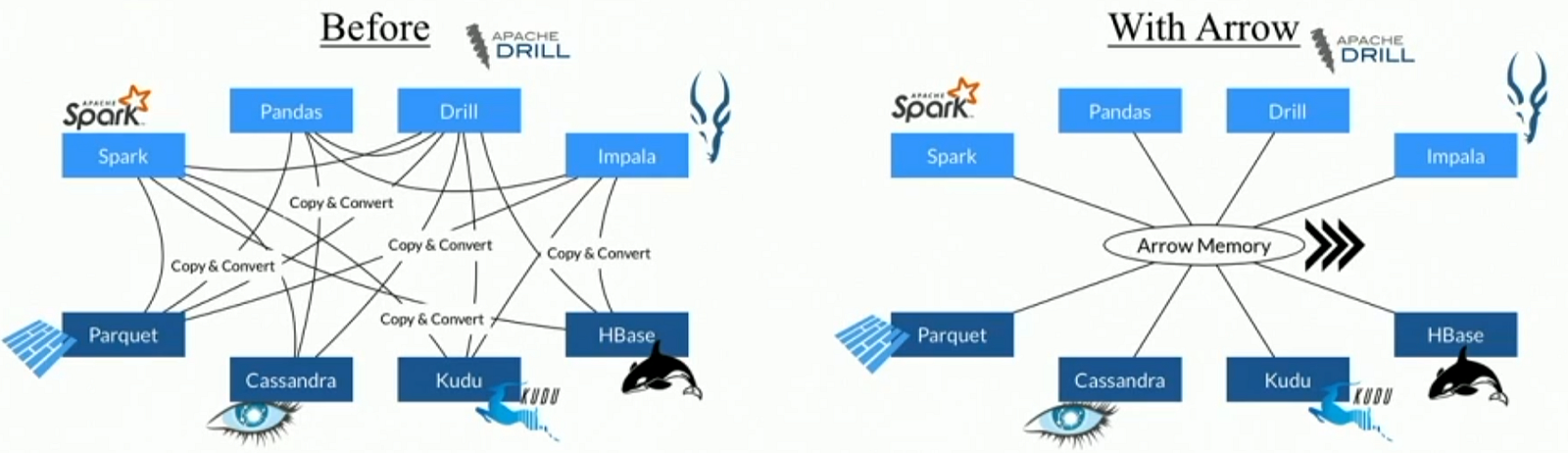
Arrow isn’t a standalone piece of software but rather a component used to accelerate analytics within a particular system and to allow Arrow-enabled systems to exchange data with low overhead. It is sufficiently flexible to support most complex data models.
In simple words, It facilitates communication between many components, for example, reading a parquet file with Python (pandas) and transforming to a Spark dataframe, Falcon Data Visualization or Cassandra without worrying about conversion.
For the Python and R communities, Arrow is extremely important, as data interoperability has been one of the biggest roadblocks to tighter integration with big data systems (which largely run on the JVM).
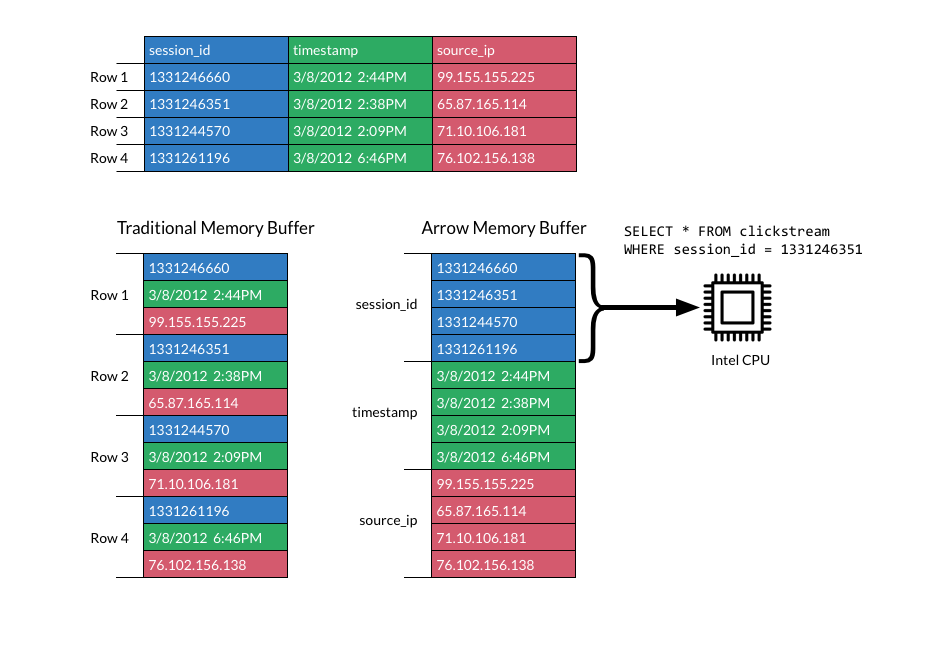
A good question is to ask how does the data look like in memory? Well, Apache Arrow takes advantages of a columnar buffer to reduce IO and accelerate analytical processing performance.
In our case, we will use the pyarrow library to execute some basic codes and check some features. In order to install, we have two options using conda or pip commands*.
conda install -c conda-forge pyarrow
or
pip install pyarrow
*It’s recommended to use conda in a Python 3 environment.
Apache Arrow with Pandas (Local File System) #
Converting Pandas Dataframe to Apache Arrow Table #
import numpy as np
import pandas as pd
import pyarrow as pa
df = pd.DataFrame({'one': [20, np.nan, 2.5],'two': ['january', 'february', 'march'],'three': [True, False, True]},index=list('abc'))
table = pa.Table.from_pandas(df)
Pyarrow Table to Pandas Data Frame #
df_new = table.to_pandas()
Read CSV #
from pyarrow import csv
fn = ‘data/demo.csv’
table = csv.read_csv(fn)
df = table.to_pandas()
Writing a parquet file from Apache Arrow #
import pyarrow.parquet as pq
pq.write_table(table, 'example.parquet')
Reading a parquet file #
table2 = pq.read_table(‘example.parquet’)
table2
Reading some columns from a parquet file #
table2 = pq.read_table('example.parquet', columns=['one', 'three'])
Reading from Partitioned Datasets #
dataset = pq.ParquetDataset(‘dataset_name_directory/’)
table = dataset.read()
table
Transforming Parquet file into a Pandas DataFrame #
pdf = pq.read_pandas('example.parquet', columns=['two']).to_pandas()
pdf
Avoiding pandas index #
table = pa.Table.from_pandas(df, preserve_index=False)
pq.write_table(table, 'example_noindex.parquet')
t = pq.read_table('example_noindex.parquet')
t.to_pandas()
Check metadata #
parquet_file = pq.ParquetFile(‘example.parquet’)
parquet_file.metadata
See data schema #
parquet_file.schema
Timestamp #
Remember Pandas use nanoseconds so you can truncate in milliseconds for compatibility.
pq.write_table(table, where, coerce_timestamps='ms')
pq.write_table(table, where, coerce_timestamps='ms', allow_truncated_timestamps=True)
Compression #
By default, Apache arrow uses snappy compression (not so compressed but easier access), although other codecs are allowed.
pq.write_table(table, where, compression='snappy')
pq.write_table(table, where, compression='gzip')
pq.write_table(table, where, compression='brotli')
pq.write_table(table, where, compression='none')
Also, It’s possible to use more than one compression in a table
pq.write_table(table, ‘example_diffcompr.parquet’, compression={b’one’: ‘snappy’, b’two’: ‘gzip’})
Write a partitioned Parquet table #
df = pd.DataFrame({‘one’: [1, 2.5, 3],
                   ‘two’: [‘Peru’, ‘Brasil’, ‘Canada’],
                   ‘three’: [True, False, True]},
                   index=list(‘abc’))
table = pa.Table.from_pandas(df)
pq.write_to_dataset(table, root_path=’dataset_name’,partition_cols=[‘one’, ‘two’])